Welcome to my Lab
Welcome to my Lab
I have built a small collection of hardware and software for exploring X.25 networking. It contains routers, interfaces and bridges from the 1990s through to the early 2020s.
The Problem
X.25 networks used to be common in aviation and telecommunications, but now they are rare and the hardware is becoming harder to get.
In setting up this lab, it has been challenging to work out which interfaces work with which routers, under which IOS versions and feature sets, to talk to what.
I aim to gather practical information about building and running X.25 networks using a variety of hardware and software.
Routers
Cisco 2513
This Cisco 2513 represents ancient (1990s) routers. It might have originally been used to connect a Token Ring network to the wider world over the serial interfaces.
It has no slots, but has a 10Mb/s AUI network interface (which requires a now expensive adapter to connect to ethernet), along with 2 synchronous serial interfaces and a Token Ring interface.
Cisco 1921/K9 - IOS 15.7(3)M9
This Cisco 1921 represents relatively modern routers. It is running C1900-UNIVERSALK9-M, Version 15.7(3)M9 and is licensed as ipbasek9. It has 512M of memory and 256M of flash.
It has two EHWIC slots that can accept high-speed WAN interface cards (HWIC), Voice/WAN interface cards (VWIC) and WAN interface cards (WIC). A lot of older WAN cards were no longer supported by the software in the 1900/2900 and later series, which presents a challenge in getting it onto my X.25 network.
I use this router in these experiments:
Cisco 3845 - IOS 15.1(4)M10
This Cisco 3845 is a workhorse enterprise branch office router that represents the consolidation of voice and data networks. It is running C3845-ADVENTERPRISEK9-M, Version 15.1(4)M10. It supports a huge range of interfaces via 4 HWIC and 4 network module slots. With 512M of memory and 256M of flash this is a versatile router. It’s also the noisiest of the set.
My 3845 contains a 64-channel (G.711) Voice/Fax PVDMII DSP SIMM PVDM daughter card, so it was probably used for voice/VOIP at some point.
I use this router in these experiments:
Cisco 2610 - IOS 12.1(27b)
This Cisco 2610 it is running C2600-IS-M, Version 12.1(27b).
It has two EHWIC slots that can accept high-speed WAN interface cards (HWIC), Voice/WAN interface cards (VWIC) and WAN interface cards (WIC). It also has a Network Module slot.
IOS 12.2 and later require more memory, and cards like the VWIC-1MFT-T1/E1 require at least IOS 12.3(14)T or 12.4(1). This limits me to serial cards that I can use in the WIC slots since this device has 32M of memory and 16M of flash. I could upgrade the memory to 64M (5v 100 pin DIMM), but buying a 2600-XM series device would be a more economical choice.
The Network Module slot contains a PRI-2CE1B ISDN card, which I purchased to connect to an NTU (network termination unit).
Cisco 2600 Series Hardware View is a good reference for discovering what cards work with this router.
I use this router in these experiments:
Cisco X.25 stacks
The 1921, 3845 and 2610 all have the same X.25 software stack versions:
# show x25
X.25 software, Version 3.0.0.
...
XOT software, Version 2.0.0.
WAN Cards
There are two main options for Cisco X.25 WAN cards:
- Synchronous Serial cards. Initially, I thought this was the only option. Synchronous serial uses a shared clock signal for sending and receiving data, enabling them to operate at higher speeds compared to asynchronous serial.
- ISDN T1/E1 cards. I later learnt that PRI ISDN cards are a great way to connect routers and build X.25 networks. They are more readily available than serial cards, and don’t require special and expensive cables. If you can crimp a network cable, you can build an ISDN crossover cable.
Both options permit multiplexing multiple X.25 connections over the same interface. The difference is that serial speed drops off faster over distance:
| Data Rate (Baud) | Distance (Feet) | Distance (Meters) |
|---|---|---|
| 2400 | 4,100 | 1,250 |
| 4800 | 2,050 | 625 |
| 9600 | 1,025 | 312 |
| 19200 | 513 | 156 |
| 38400 | 256 | 78 |
| 56000 | 102 | 31 |
| T1 | 50 | 15 |
Serial speed over distance from CAB-X21 MT and CAB-X21 FC Serial Cable Specifications
ISDN T1 and E1 should be good for around 200-300 meters (660-980 feet), which is more than ten times further than X.21 serial at that speed.
Interface compatibility with my routers
| Interface | 2610 | 3845 | 1921 |
|---|---|---|---|
| WIC-1T LFH-60 | Detected | Detected | Not Supported |
| WIC-2T Smart Serial | ✅ Yes | ? | Not Supported |
| Serial-4T LFH-60 | ? | ✅ Yes | Not Supported |
| VWIC2-1MFT-T1/E1 | ? | ✅ Yes | ? |
| VWIC3-1MFT-T1/E1 | ? | ? | ✅ Yes |
| PRI 2CE1B ISDN | ✅ Yes | ? | No NM Slots |
To use synchronous serial with the 1921, this page says that I would need a HWIC-1T, HWIC-2T or a HWIC-2A/S card.
WIC-1T Synchronous Serial (LFH-60)
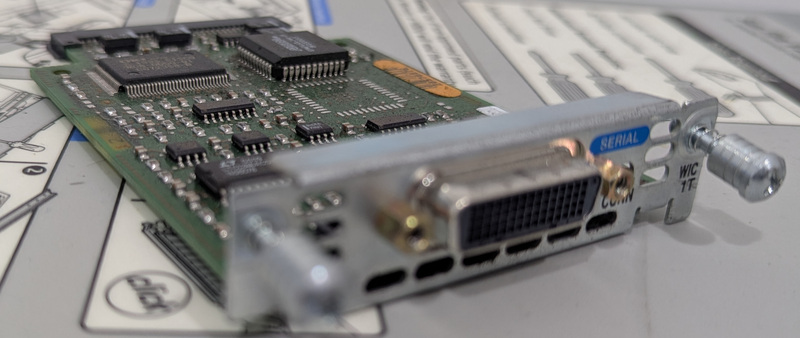 WIC-1T Serial Card
The WIC-1T supports a 2Mb/s serial connection. It has a LFH-60 receptacle on the card and supports 5-in-1 cables for:
- Back to back connection with other Cisco serial cards.
- x.21: A smaller connection typically used on external DCE/DTE devices for connecting to public networks.
- V.35: A large connector for X.25 public networks.
- etc…
Cisco’s Understanding the 1-Port Serial WAN Interface Card (WIC-1T) page is a good starting point for this card.
WIC-2T Synchronous Serial (Smart Serial)
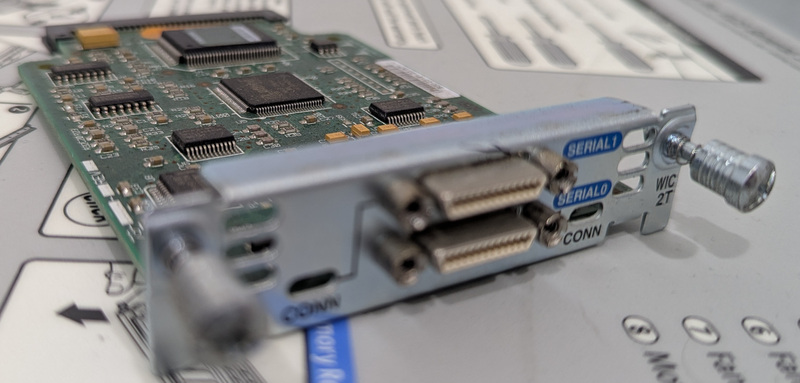 WIC-2T Serial Card
The WIC-2T supports two 2Mb/s serial connections. It has Smart Serial receptacle on the card and supports 12-in-1 cables for:
- Back to back connection with other Cisco serial cards.
- x.21 and V.35
- RS-232 and RS-449 asynchronous serial.
- etc…
Both the WIC-1T and WIC-2T show up as PowerQUICC Serial in show interfaces.
Cisco’s Understanding the 2-Port Serial WAN Interface Card (WIC-2T) page is a good starting point for this card.
I use this card in these experiments:
Serial-4T Synchronous Serial (LFH-60)
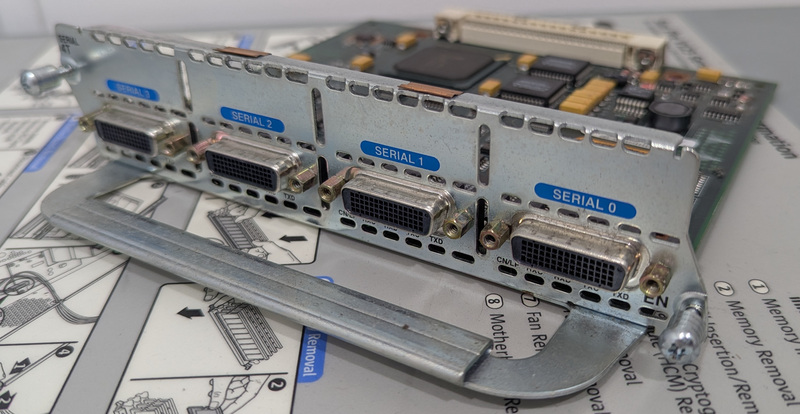 Serial-4T Network Module
The WIC-4T supports four 2Mb/s serial connections (or faster with fewer connections). It has LFH-60 receptacles supports various 5-in-1 cables. show diag reports this card as a Mueslix-4T Port adapter.
Cisco’s Understanding the 4-Port Sync Serial Network Module (NM-4T) page is a good starting point for this card.
I use this card in these experiments:
VWIC2-1MFT-T1/E1 ISDN card
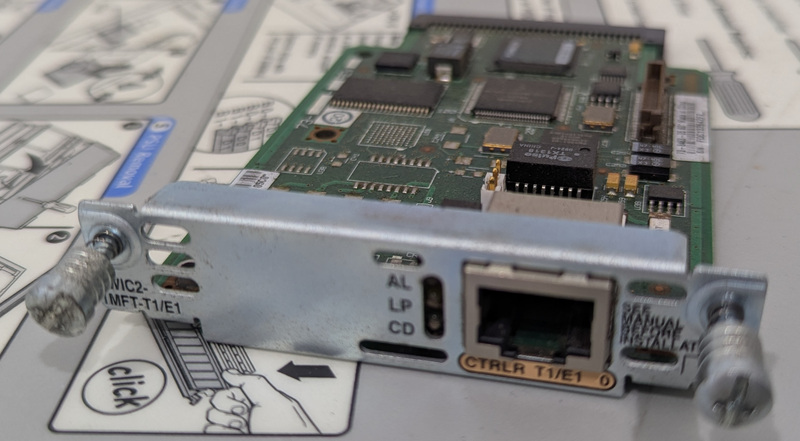 VWIC2-1MFT-T1/E1 - 1-Port RJ-48 Multiflex Trunk - T1/E1
This is the older E1/T1 VWIC, which is compatible with routers up to the Cisco 2800 series. It can be connected back to back with other E1/T1 interfaces for a connection of up to 2Mb/s.
VWIC3-1MFT-T1/E1 ISDN card
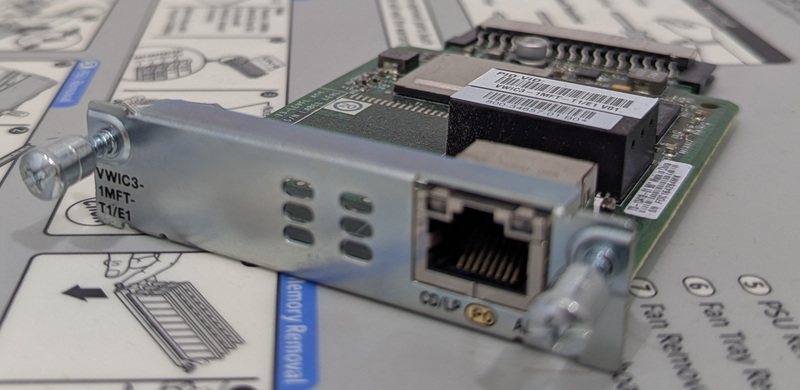 VWIC3-1MFT-T1/E1 - 1-Port RJ-48 Multiflex Trunk - T1/E1
This is the newer E1/T1 VWIC, which is compatible with routers starting with the Cisco 1900 series. It can be connected back to back with other E1/T1 interfaces for a connection of up to 2Mb/s.
Cisco’s Configuring Voice and Data on 1-Port and 2-Port T1/E1 VWIC3 page is a good starting point for this card.
WIC 1B-S/T V3 BRI ISDN card
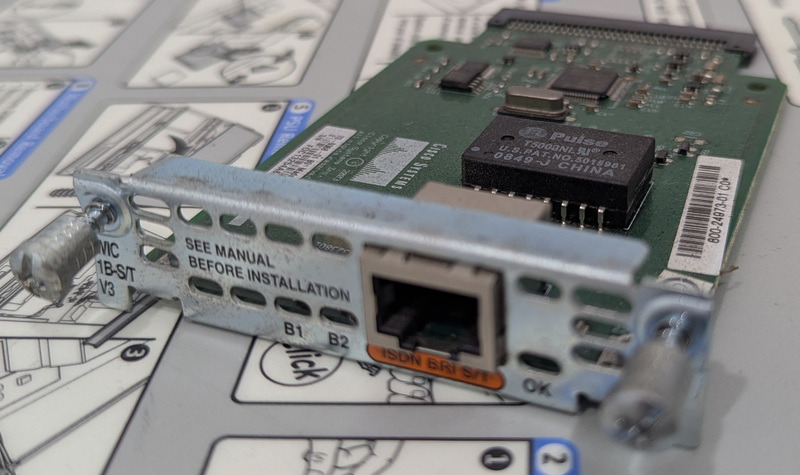 WIC 1B-S/T V3 BRI
As far as I know, BRI (2x64k + 1x16k) interfaces can’t be connected back to back with anything I have. This is unfortunate, because they are also easy to get (it seems like every second hand router comes with one).
S/T cards are useless without an NT1 to connect them to (such as the WIC-1B-U). The config for that is at Cisco Network Side ISDN BRI Voice Interface Cards.
PRI-2CE1B ISDN card
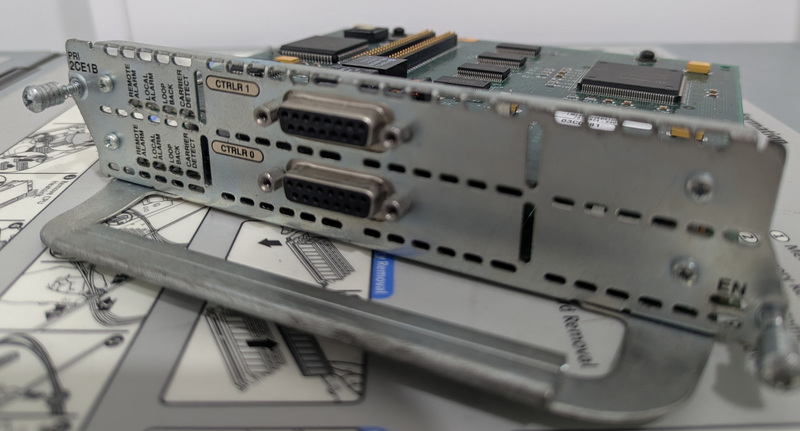 PRI 2CE1B 2 Port Channelised E1/ISDN PRI
The PRI-2CE1B supports two 2MB/s E1 connections with balanced or unbalanced 75 or 120 ohm connections. It supports 30 E1 virtual channels (which is different to the thousands of X.25 channels that you can run over the connection).
I got this module because I wanted a card that supported G.703 (a specific subset of E1) to connect to my NTU. Working out the pinout for the DB-15 (DA-15) connector was a pain. The NM-2CE1T1-PRI was designed to replace this network module and comes with RJ-48C connectors.
Cisco’s ISDN PRI Network Modules page is a good starting point for this module.
Bridges
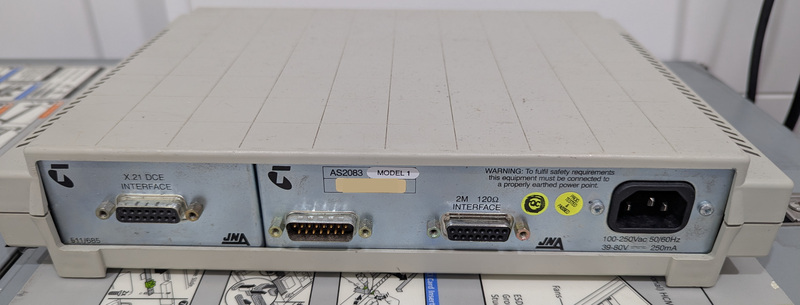 JNA ISDN/X.21 DCE Bridge
This JNA bridge connects between an external ISDN network and an internal network. It was typically used to provide up to 2Mb/s internet access over E1. The 120 ohm interface is the ISDN side. It came with an adapter that converts this to an RJ-48 plug.