Cisco XOT to XOT
Cisco XOT to XOT
Following a conversation on the x25.org mailing list, I investigated whether a single Cisco router could accept an XOT connection and route it out again over XOT.
Conventional wisdom is that a Cisco router does not support XOT to XOT connections.
The mailing list post asked whether this was possible if you used a loopback serial connection.
It is possible:
- Bandwidth is limited by a combination of router CPU and serial bandwidth. I achieved up to 70 calls per second and transferred 280KB/s.
- If you send large data packets segment boundaries are not preserved. X.25 normally supports accurate reconstruction of original packet boundaries using the M bit, however Cisco outbound XOT does not use this bit. This applies to any XOT call originated by a router.
- Packet sizes up to 4096 bytes can be passed through end to end (depending on your hardware).
- Up to 4095 concurrent connections can be handled at a time.
I used a Cisco 3845 running IOS Version 15.1(4)M10 for this testing.
Serial Loopback
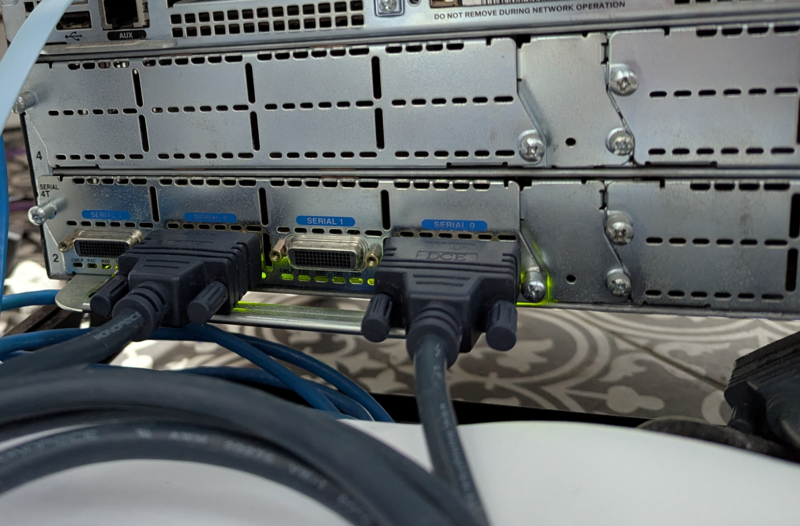
With a loopback cable (sync serial or ISDN) connected to our router, we can achieve XOT <-> Serial <-> XOT using a single router:
(click to expand): Basic configuration for XOT to XOT over serial loopback
service pad to-xot

x25 profile default dxe
 x25 win 7
 x25 wout 7
 x25 ips 2048
 x25 ops 2048

x25 routing

xot access-group 10 profile default
access-list 10 permit any

interface Serial2/0
 description XOT XOT serial loopback A
 no ip address
 encapsulation x25
 x25 win 7
 x25 wout 7
 x25 ips 2048
 x25 ops 2048

interface Serial2/2
 description XOT XOT serial loopback B
 no ip address
 encapsulation x25 dce
 x25 win 7
 x25 wout 7
 x25 ips 2048
 x25 ops 2048

x25 route ^10(......+)$ substitute-dest \1 interface Serial2/0
x25 route 700100 xot 192.0.2.1 xot-keepalive-period 10 xot-keepalive-tries 3
x25 route 700101 xot 192.0.2.3 xot-keepalive-period 10 xot-keepalive-tries 3
x25 route ^(...)(...) xot dns \2.\1.x25.org
x25 route .* clear
With the looppback cable and route in place, the links for a single call are:
- 192.0.2.1 initiates a call to 192.0.2.2 for 10700101 over XOT (assigning virtual circuit 1 to the link).
- 192.0.2.2 strips the prefix and routes the call to 700101 over Serial2/0 (assigning virtual circuit 1024 to the link).
- 192.0.2.2 receives the call for 700101 over Serial2/2 and routes it to XOT (receiving virtual circuit 1024 for the link).
- 192.0.2.2 initiates a call to 192.0.2.3 for 700101 over XOT (assigning virtual circuit 1 to the link).
The magic here is the routing, x25 route ^10(......+)$ substitute-dest \1 interface Serial2/0. This entry routes calls with a prefix of 10, strips the prefix and sends them out Serial2/0, which comes back in Serial2/2 for further routing. The eventual destination after loopback can be XOT or serial.
Stress test result
With this link in place, we get ok (but not great) stress test results:
--- Stress Test Summary ---
Run Time: 9.55 seconds
Calls Made: 581
Calls Received: 0
Calls Failed: 0
Packets Sent: 581
Packets Received: 581
Bytes Sent: 1210462
Bytes Received: 1210462
Data Mismatches: 0

--- Errors/Timeouts ---
Socket Errors: 0
Setsockopt Errors: 0
Bind Errors: 0
Facilities Errors: 0
Short Receives: 0
Write Errors: 0
Accept Errors: 0
Connect Timeouts: 0
Packet Size Negotiated (In):  Min: 1024, Max: 1024
Packet Size Negotiated (Out): Min: 1024, Max: 1024
Window Size Negotiated (In):  Min: 7, Max: 7
Window Size Negotiated (Out): Min: 7, Max: 7
Average Bandwidth (Sent): 123.82 KB/s
Average Bandwidth (Recv): 123.82 KB/s
---------------------------
After the stress test, show x25 vc now shows hundreds of virtual circuits on the router in state P6 (Clear Request sent by DTE but no Clear Confirmation seen).
Let’s clear those then work out how to prevent that happening:
c3845# clear x25 Serial2/0
Force Restart [confirm]
c3845# show x25 vc
c3845#
Virtual Circuits accumulating in state P6
Wireshark shows that the XOT client sends a Clear Request then sends a TCP FIN, closing the connection. It should wait for a Clear Confirmation. Likewise, the recipient XOT server closed connections after receiving a Clear Request (before it even sent the Clear Confirmation back). These aggressive disconnections resulted in middle boxes missing out on Clear Confirmation and leaving circuits half closed.
This bug would have been easy to miss without a stress test, since connections in state P6 close after a timeout (3 minutes by default).
If the client was not modifiable, we could have mitigated by setting a smaller T13 and T23 timer values (which controls the amount of time a connection spends in P6). If we can handle 1024 concurrent connections and the timeout is 180 seconds, we can average 5 connections per second. If we set the timeout to 5, we could handle 204 connections/second on average.
Fixing this software bug resulted in no more connections in state P6 being left behind after tests.
Segment boundary preservation
A major difference between X.25 and TCP is that X.25 is packetized (data is divided into blocks) while TCP is stream based (data is a series of bytes). X.25 breaks larger data packets into smaller fragments, and marks all of them (except the last) with the M (more data) bit. This ensures that packet boundaries are preserved.
Unfortunately, packet boundaries are not preserved on outbound XOT links from my router.
Here are two incoming fragments with the M bit set:
Jul  8 00:00:38.353: [192.0.2.1,38708/192.0.2.2,1998]: XOT I D1 Data (1027) 8 lci 1 M PS 0 PR 0
Jul  8 00:00:38.353: [192.0.2.1,38708/192.0.2.2,1998]: XOT I D1 Data (1027) 8 lci 1 M PS 1 PR 0
Then the go out over serial with the M bit set:
Jul  8 00:00:38.353: Serial2/0: X.25 O D1 Data (1027) 8 lci 1 M PS 0 PR 0
Jul  8 00:00:38.353: Serial2/0: X.25 O D1 Data (1027) 8 lci 1 M PS 1 PR 0
And are received again:
Jul  8 00:00:38.357: Serial2/2: X.25 I D1 Data (1027) 8 lci 1 M PS 0 PR 0
Jul  8 00:00:38.361: Serial2/2: X.25 I D1 Data (1027) 8 lci 1 M PS 1 PR 0
And are transmitted without the M bit:
Jul  8 00:00:38.357: [192.0.2.3,1998/192.0.2.2,36409]: XOT O D1 Data (1027) 8 lci 1 PS 0 PR 0
Jul  8 00:00:38.361: [192.0.2.3,1998/192.0.2.2,36409]: XOT O D1 Data (1027) 8 lci 1 PS 1 PR 0
If boundary preservation is important, it appears that Cisco outbound XOT does not suit your use case. Instead, Record Boundary Preservation might work better.
Increasing connection limits
By default, this router can support 1024 concurrent virtual circuits per link (e.g. a serial link). This is controlled by virtual circuit range settings:
| Parameter | Default | Command |
|---|---|---|
| Lowest Incoming-Only circuit number | 0 | x25 lic |
| Highest Incoming-Only circuit number | 0 | x25 hic |
| Lowest Two-Way circuit number | 1 | x25 ltc |
| Highest Two-Way circuit number | 1024 (x25) | x25 htc |
| Lowest Outgoing-Only circuit number | 0 | x25 loc |
| Highest Outgoing-Only circuit number | 0 | x25 hoc |
Things can get confusing here though. Normally these settings depend on whether you are the DTE or DCE, but Cisco also apply some normalisation to the language:
| Parameter | DTE applies this to | DCE applies this to |
|---|---|---|
lic/hic Incoming-Only circuit number |
Incoming calls to router | Outgoing calls from router |
ltc/htc Two-Way circuit number |
Bidirectional assigned from high to low | Bidirectional assigned from low to high |
loc/hoc Outgoing-Only circuit number |
Outgoing calls from router | Incoming calls to router |
With my routing, Serial2/0 only makes outgoing calls and Serial2/2 only receives incoming calls. I changed Serial2/0 to DCE and ended up with the following working configuration (DTE to DCE also used loc/hoc):
interface Serial2/0
 description XOT XOT serial loopback A
 encapsulation x25 dce
 x25 lic 1
 x25 hic 4095
 x25 ltc 0
 x25 htc 0

interface Serial2/2
 description XOT XOT serial loopback B
 encapsulation x25
 x25 lic 1
 x25 hic 4095
 x25 ltc 0
 x25 htc 0
We should be able to run 4095 concurrent connections through the router now.
Increasing packet size
The stress test output shows that it was only able to negotiate a packet size of 1024 bytes. It would be nice to have larger packets, since 4.5x Faster Linux X.25 Handling showed that larger packets can lead to faster transfers.
To get started I set desired packet sizes on both the x25 profile and the serial interfaces:
 x25 subscribe packetsize permit 128 4096 target 2048 4096
 x25 subscribe windowsize permit 1 127 target 7 7
x25 debug shows that the size is still being clamped when calls are received over XOT:
Jul  8 00:00:04.251: [192.0.2.1,42150/192.0.2.2,1998]: XOT I P/Inactive Call (23) 8 lci 1
Jul  8 00:00:04.251:   From (15): 700100092300000 To (8): 10700101
Jul  8 00:00:04.251:   Facilities: (6)
Jul  8 00:00:04.251:     Packet sizes: 2048 2048
Jul  8 00:00:04.251:     Window sizes: 7 7
Jul  8 00:00:04.251:    : X.25 Lowered value: Packet sizes
Jul  8 00:00:04.251: Serial2/0: X.25 O R1 Call (19) 8 lci 1024
Jul  8 00:00:04.251:   From (15): 700100092300000 To (6): 700101
Jul  8 00:00:04.251:   Facilities: (3)
Jul  8 00:00:04.251:     Packet sizes: 1024 1024
Quick experiments:
pad 700100(XOT only) negotiates 2048/2048.pad 10700100(Serial to XOT) negotiates 1024/1024 over serial and 2048/2048 over the XOT link.
The router seems to think that the serial link is limited to 1024 byte user data.
show x25 context outputs LAPB DTE, state CONNECT, modulo 8, k 7, N1 12056, N2 20:
  X.25 DTE, version 1984, address <none>, state R1, modulo 8, timer 0
      Defaults: idle VC timeout 0
        cisco encapsulation
        input/output window sizes 7/7, packet sizes 2048/2048
      Window sizes: permitted 1-7, target 7-7
      Packet sizes: permitted 128-4096, target 2048-4096
      Timers: T20 180, T21 200, T22 180, T23 180
      Channels: Incoming-only none, Two-way 1-1024, Outgoing-only none
      RESTARTs 4/1 CALLs 586+6/0+0/0+0 DIAGs 0/0
  LAPB DTE, state CONNECT, modulo 8, k 7, N1 12056, N2 20
      T1 3000, T2 0, interface outage (partial T3) 0, T4 0
      VS 4, VR 0, tx NR 0, Remote VR 4, Retransmissions 0
      Queues: U/S frames 0, I frames 0, unack. 0, reTx 0
      IFRAMEs 3260/2666 RNRs 0/0 REJs 0/0 SABM/Es 2/2 FRMRs 0/0 DISCs 0/0
This says:
- The serial link is established (
state CONNECT). - Sequence numbers are modulo 8 (
modulo 8). - Window size is 7 (
k 7). - Maximum frame size is 1507 bytes since N1 is in bits here (
N1 12056). - 20 retransmissions before link failure (
N2 20).
N1 is the smoking gun, the serial link itself has a hardware MTU of 1507 bytes.
Initial attempts to increase the value complain about the hardware MTU:
c3845(config-if)#lapb n1 ?
  <1096-12104>  LAPB N1 parameter (bits; multiple of 8)

c3845(config-if)#lapb n1 12104 ! 1513 bytes
%N1 too large for hardware MTU

c3845(config-if)#lapb n1 12056 ! 1507 bytes
c3845(config-if)#
X.25 Facility Handling confirms this diagnosis:
These facilities are specified in all originated calls relating to the given interface and map, with one exception: the incoming and outgoing maximum packetsizes proposed are lowered if the LAPB cannot support the specified data packet size.
However, we can set the hardware MTU, enabling us to increase N1. At the same time I increase the serial clock rate to 4Mbps (up from the default 2Mbps). It was also time to stop hard coding x25 ips etc:
x25 profile default dxe
 x25 address 700005
 x25 subscribe packetsize permit 128 4096 target 1024 4096
 x25 subscribe windowsize permit 1 127 target 7 7

interface Serial2/0
 description XOT XOT serial loopback A
 mtu 9000
 lapb N1 32856
 encapsulation x25 dce
 x25 lic 1
 x25 hic 4095
 x25 ltc 0
 x25 htc 0
 x25 subscribe packetsize permit 128 4096 target 1024 4096
 x25 subscribe windowsize permit 1 127 target 7 7
 clock rate 4032000

interface Serial2/2
 description XOT XOT serial loopback B
 mtu 9000
 lapb N1 32856
 encapsulation x25
 x25 lic 1
 x25 hic 4095
 x25 ltc 0
 x25 htc 0
 x25 subscribe packetsize permit 128 4096 target 1024 4096
 x25 subscribe windowsize permit 1 127 target 7 7
I found that a reload was required in order for the increase in N1 to take effect (this was probably not necessary had I known the right command).
With that out of the way, I can now make end to end connections with packet sizes 1024 through 4096.
This change increased our N1 limit and our serial link is now running at 4Mbps:
c3845# show x25 context
Serial2/0
  X.25 DCE, version 1984, address <none>, state R1, modulo 8, timer 0
      Defaults: idle VC timeout 0
        cisco encapsulation
        input/output window sizes 2/2, packet sizes 128/128
      Window sizes: permitted 1-7, target 7-7
      Packet sizes: permitted 128-4096, target 1024-4096
      Timers: T10 60, T11 180, T12 60, T13 60
      Channels: Incoming-only 1-4095, Two-way none, Outgoing-only none
      RESTARTs 2/0 CALLs 7896+12/0+0/0+0 DIAGs 0/0
  LAPB DCE, state CONNECT, modulo 8, k 7, N1 32856, N2 20
      T1 3000, T2 0, interface outage (partial T3) 0, T4 0
      VS 7, VR 7, tx NR 7, Remote VR 7, Retransmissions 0
      Queues: U/S frames 0, I frames 0, unack. 0, reTx 0
      IFRAMEs 33271/32939 RNRs 0/0 REJs 0/0 SABM/Es 2/0 FRMRs 0/0 DISCs 0/0
Serial2/2
  X.25 DTE, version 1984, address <none>, state R1, modulo 8, timer 0
      Defaults: idle VC timeout 0
        cisco encapsulation
        input/output window sizes 2/2, packet sizes 128/128
      Window sizes: permitted 1-7, target 7-7
      Packet sizes: permitted 128-4096, target 1024-4096
      Timers: T20 180, T21 200, T22 180, T23 180
      Channels: Incoming-only 1-4095, Two-way none, Outgoing-only none
      RESTARTs 2/0 CALLs 0+0/7896+12/7908+0 DIAGs 0/0
  LAPB DTE, state CONNECT, modulo 8, k 7, N1 32856, N2 20
...

c3845# show controllers Serial 2/0
M4T: show controller:
...
line state: up
cable type : V.35 DCE cable, received clockrate 4032000
New Stress Test Results
(click to expand): Final configuration for XOT to XOT over serial loopback
service pad to-xot

x25 profile default dxe
 x25 address 700005
 x25 subscribe packetsize permit 128 4096 target 1024 4096
 x25 subscribe windowsize permit 1 127 target 7 7

x25 routing

xot access-group 10 profile default
access-list 10 permit any

interface Serial2/0
 description XOT XOT serial loopback A
 mtu 9000
 no ip address
 encapsulation x25 dce
 x25 lic 1
 x25 hic 4095
 x25 ltc 0
 x25 htc 0
 x25 subscribe packetsize permit 128 4096 target 1024 4096
 x25 subscribe windowsize permit 1 127 target 7 7
 serial restart-delay 0
 clock rate 4032000
 lapb N1 32856

interface Serial2/2
 description XOT XOT serial loopback B
 mtu 9000
 no ip address
 encapsulation x25
 x25 lic 1
 x25 hic 4095
 x25 ltc 0
 x25 htc 0
 x25 subscribe packetsize permit 128 4096 target 1024 4096
 x25 subscribe windowsize permit 1 127 target 7 7
 serial restart-delay 0
 lapb N1 32856

x25 route ^10(......+)$ substitute-dest \1 interface Serial2/0
x25 route 700100 xot 192.0.2.1 xot-keepalive-period 10 xot-keepalive-tries 3
x25 route 700101 xot 192.0.2.3 xot-keepalive-period 10 xot-keepalive-tries 3
x25 route .* clear
Stress test can now make around 4,200 calls per minute and transfer data at a rate of 288KB/s (2,304Kb/s out of our 4,032Kb/s serial link):
> ./stress_test -l 8192 -T 60 -n 10000 -N 4 -a 700100 -W 7 -P 1024 -d 10700101,10700101

--- Stress Test Summary ---
Run Time: 59.75 seconds
Calls Made: 4236
Calls Received: 0
Calls Failed: 0
Packets Sent: 4236
Packets Received: 4236
Bytes Sent: 17260244
Bytes Received: 17260244
Data Mismatches: 0

--- Errors/Timeouts ---
Socket Errors: 0
Setsockopt Errors: 0
Bind Errors: 0
Facilities Errors: 0
Short Receives: 0
Write Errors: 0
Accept Errors: 0
Connect Timeouts: 0
Packet Size Negotiated (In):  Min: 1024, Max: 1024
Packet Size Negotiated (Out): Min: 1024, Max: 1024
Window Size Negotiated (In):  Min: 7, Max: 7
Window Size Negotiated (Out): Min: 7, Max: 7
Average Bandwidth (Sent): 282.10 KB/s
Average Bandwidth (Recv): 282.10 KB/s
---------------------------
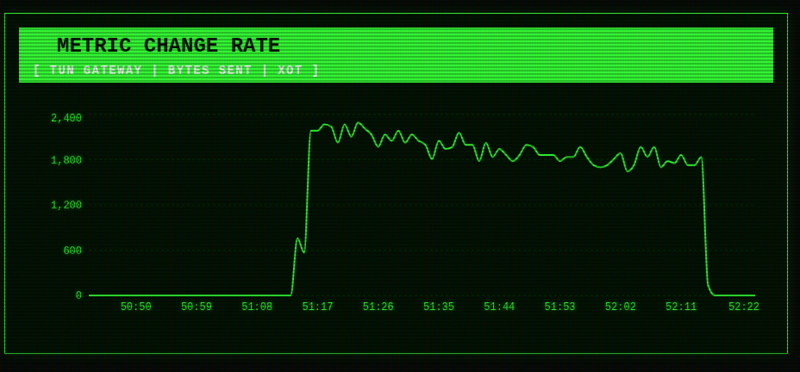 XOT to XOT Bytes/sec
Stress test does load up the router CPU a bit. Around 23% is accountable to TCP/IP and X.25 handling on the CPU:
c3845# show processes cpu sorted
CPU utilization for five seconds: 2%/0%; one minute: 22%; five minutes: 9%
 PID Runtime(ms)     Invoked      uSecs   5Sec   1Min   5Min TTY Process
139       58616      111235        526  0.00% 14.43%  6.01%   0 IP Input
216        9908       44440        222  0.00%  4.80%  1.91%   0 X.25 Background
363       17548      109866        159  0.00%  3.32%  1.41%   0 TCP Driver
372          52       29524          1  0.00%  0.13%  0.05%   0 LAPB Timer
Stress test results in about 77% CPU utilisation on the router:
c3845# show processes cpu history

c3845   00:00:31 PM Tuesday Jul 7 2026 UTC

      6667777777777777777777777777777777777777777777777777777777
      888666666666677777777777777777777555556666666666555554444466
  100
   90
   80    **************************************************
   70 **********************************************************
   60 **********************************************************
   50 **********************************************************
   40 **********************************************************
   30 **********************************************************
   20 **********************************************************
   10 ************************************************************
     0....5....1....1....2....2....3....3....4....4....5....5....6
               0    5    0    5    0    5    0    5    0    5    0
               CPU% per second (last 60 seconds)